

Account settings
The Settings page contains account-wide configuration options that affect how EVAL behaves across your organization. These settings establish defaults that apply to all team members and all clinical workflows — from the code systems used to classify medical data to the rules governing patient record creation. Unlike other configuration areas that manage people or content, Settings shapes the underlying clinical framework your organization operates within.
Navigate to Settings in the CONFIGURATION section of the sidebar. Both Account Administrators and Account Maintenance users can access and modify these settings.
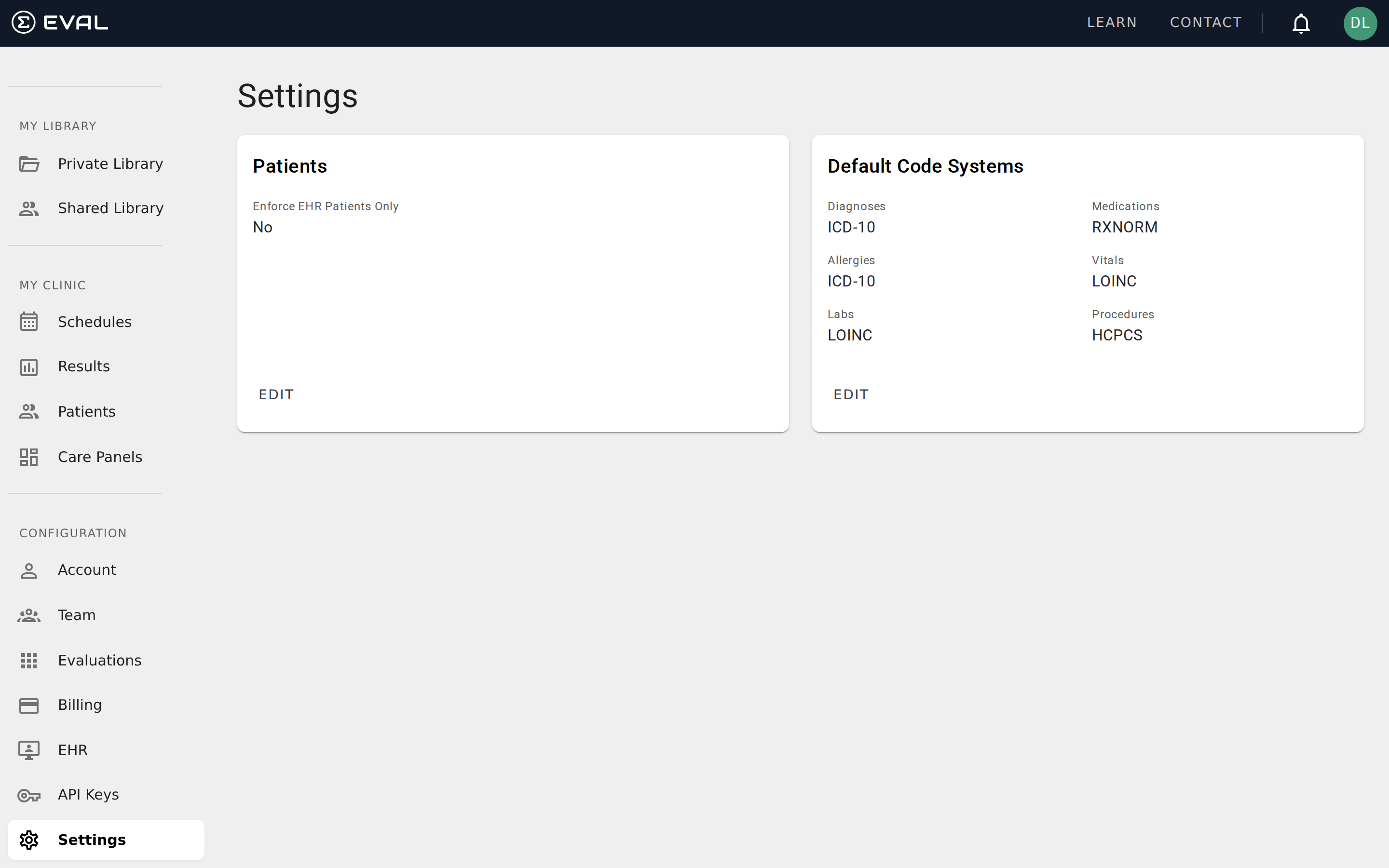
Patient settings
The Patients card controls organization-wide rules for patient management.
Enforce EHR Patients Only determines whether your team can create patient records directly in EVAL, or whether all patients must be imported from your connected electronic health record system. When set to Yes, the option to create a new patient manually in EVAL is disabled — team members can only add patients by importing them from the EHR. When set to No (the default), team members can both import from the EHR and create patient records directly.
This setting is particularly relevant for organizations with strict data governance requirements. By enforcing EHR-only patients, you ensure that all patient records in EVAL originate from your authoritative patient database, preventing duplicate or orphaned records that aren't linked to the EHR.
Default code systems
The Default Code Systems card establishes which medical terminology standards your organization uses by default when recording clinical data. EVAL supports multiple code systems, and the defaults you set here apply across all patient charts and clinical workflows in your account.
Six categories of clinical data each have their own code system setting:
Diagnoses defines the coding standard for patient diagnoses and conditions. Common options include ICD-10 (the international standard used by most healthcare organizations) and SNOMED-CT (a more granular clinical terminology).
Medications defines the coding standard for medication records. RXNORM is the most widely used standard for representing clinical drugs in the United States.
Allergies defines how allergic reactions and sensitivities are coded. Like diagnoses, this typically uses ICD-10 or SNOMED-CT depending on your organization's standards.
Vitals defines the coding standard for vital signs and physiological measurements. LOINC (Logical Observation Identifiers Names and Codes) is the standard used for laboratory and clinical observations.
Labs defines the coding standard for laboratory test results. LOINC is also the standard here, providing a universal set of codes for lab observations.
Procedures defines the coding standard for clinical procedures. HCPCS (Healthcare Common Procedure Coding System) is commonly used in the United States for procedure coding and billing.
Click Edit to change any of these defaults. The changes apply organization-wide and affect how new clinical data is coded going forward. Each category can use a different code system — you're not locked into a single standard across all data types.
Choosing the right configuration
Getting your settings right early saves time and avoids data inconsistencies later. Here are some guidelines for common scenarios.
Organizations with EHR integrations should configure their default code systems to match what their EHR uses before importing patients or clinical data. They should also consider enabling Enforce EHR Patients Only to prevent orphaned records. Aligning these settings upfront ensures smooth data synchronization from the start.
Research-focused organizations that don't connect to an EHR typically leave the patient enforcement setting at No (the default) so researchers can create patient records directly. For code systems, choose the standards most common in your research domain — LOINC for lab-heavy studies, ICD-10 for diagnostic research, or SNOMED-CT when you need maximum clinical granularity.
New organizations can start with the defaults and adjust as their needs become clearer. The default code systems (ICD-10 for diagnoses, RXNORM for medications, LOINC for vitals and labs, HCPCS for procedures) reflect the most widely adopted standards in US healthcare settings and work well for the majority of organizations getting started with EVAL.