

Medical data types
Overview
Each section on the Medical tab tracks a different type of clinical data. This page covers what each data type records, the fields you fill in when adding or editing a record, and what the status values mean.
All medical records share a common structure: a name or description, a medical code from a standard vocabulary, a status, and a recorded date. Beyond that, each type has fields specific to its clinical purpose.
Diagnoses
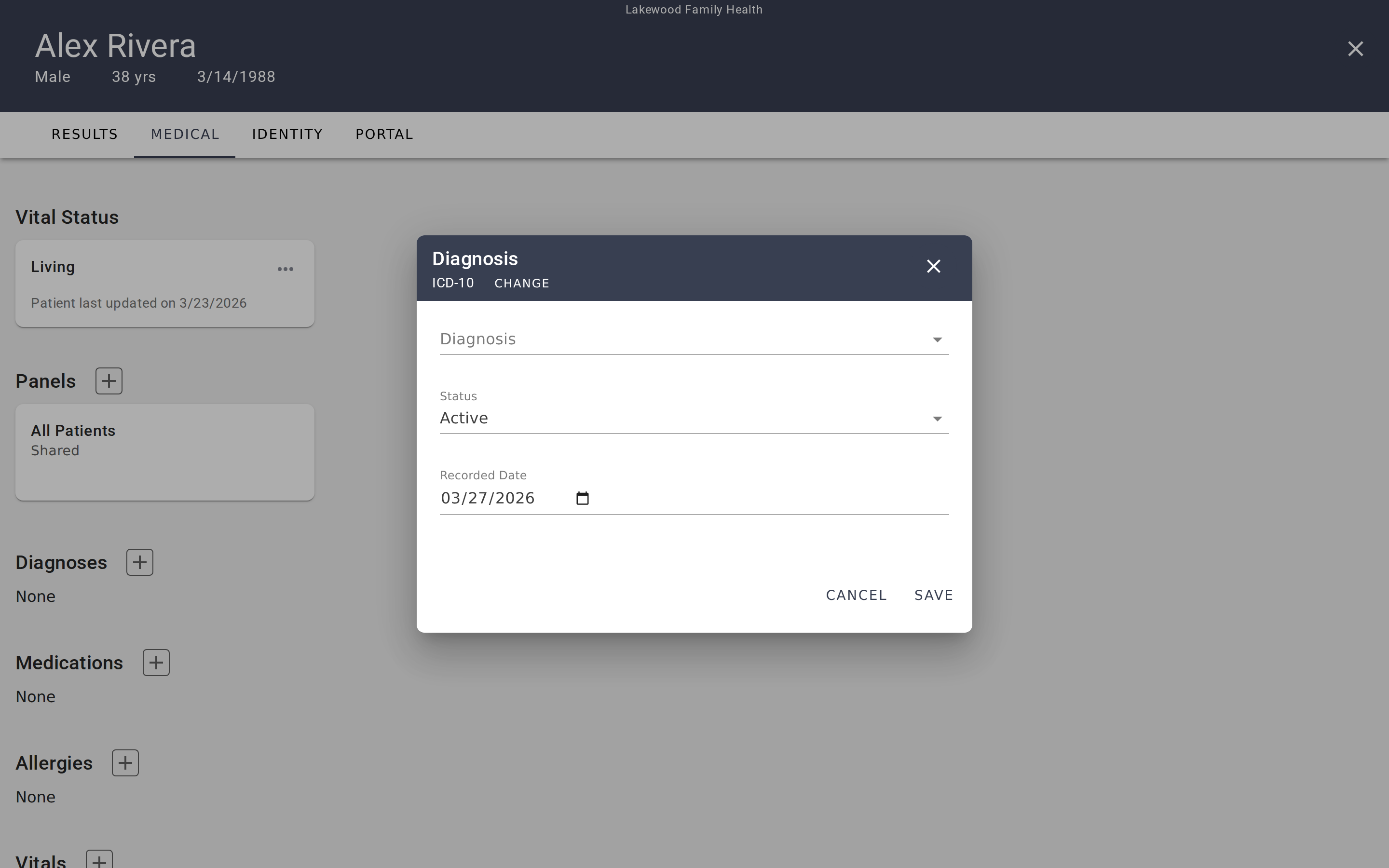
Diagnoses track a patient's medical conditions — both current and historical. Each diagnosis card shows the condition name, its status, the recorded date, and the medical code.
Fields when adding or editing:
- Code System — ICD-10 or SNOMED CT. Determines which code vocabulary the search uses.
- Diagnosis — Search and select from the chosen coding system.
- Status — Where the condition stands clinically.
- Recorded Date — When the diagnosis was recorded. Defaults to today.
Status values: Active, Recurrence, Relapse, Inactive, Remission, Resolved.
A diagnosis typically starts as Active when first recorded. Update it to Remission or Resolved when the condition improves, or to Inactive if it's no longer relevant to the patient's current care. Recurrence and Relapse indicate a condition that previously improved but has returned.
Medications
Medications record what the patient is taking or has taken, including dosage and administration details. Each card shows the medication name, dosage, status, recorded date, and code.
Fields when adding or editing:
- Code System — RXNORM or SNOMED CT.
- Medication — Search and select from the chosen coding system.
- Dosage — Free-text field for dose amount (e.g., "100mg", "50 units").
- Instructions — Free-text field for administration details (e.g., "Take once daily with food").
- Category — Classification of the medication type.
- Medication Status — Whether the medication is currently active.
- Recorded Date — Defaults to today.
Status values: Active, Completed, Entered In Error.
Active means the patient is currently taking this medication. Completed indicates a medication that has been finished (e.g., a course of antibiotics). Use Entered In Error for records that were created by mistake.
Allergies
Allergies document known allergies and sensitivities — anything from drug allergies to environmental triggers. Each card shows the allergen name, status, recorded date, and code.
Fields when adding or editing:
- Code System — ICD-10 or SNOMED CT.
- Allergy — Search and select from the chosen coding system.
- Allergy Status — Whether the allergy is currently active.
- Recorded Date — Defaults to today.
Status values: Active, Inactive, Resolved.
An Active allergy is currently relevant to the patient's care. Inactive means the allergy is no longer a concern but is kept on record. Resolved indicates the allergy has been clinically resolved (e.g., a childhood allergy the patient has outgrown).
Vitals
Vitals track physiological measurements — blood pressure, heart rate, temperature, weight, and other clinical observations. Unlike other data types, vitals are grouped by measurement type. Each card represents a type of vital sign and shows all readings for that type.
Fields when adding a new reading:
- Code System — LOINC (the standard for observation codes).
- Vital Name — Search and select from LOINC codes.
- Value Quantity — The numeric measurement value.
- Unit of Measure — The unit for the measurement (e.g., mmHg, bpm, °F).
- Status — The reliability of this reading.
- Recorded Date — Date and time of the measurement. Defaults to the current date and time.
Status values: Final, Preliminary, Amended, Corrected, Cancelled, Entered In Error, Unknown.
Most readings are Final — confirmed measurements. Use Preliminary for readings that may be updated later, Amended or Corrected for readings that have been revised, and Entered In Error for mistakes. Non-final statuses display a warning indicator on the reading so reviewers know the value may not be definitive.
Viewing readings over time
Click a vital card to open a detail view with all readings for that measurement type listed chronologically. This makes it easy to spot trends — for example, whether a patient's weight has been increasing or their resting heart rate has been improving over several months of treatment.
Labs
Labs track laboratory test results — blood panels, metabolic screenings, and other diagnostic tests. They work identically to Vitals: records are grouped by test type, each card shows all results for that test, and individual readings include a value, unit, and timestamp.
Fields when adding a new result:
- Code System — LOINC or SNOMED CT.
- Test Name — Search and select from the chosen coding system.
- Value Quantity — The test result value.
- Unit of Measure — The unit for the result.
- Status — The reliability of this result.
- Recorded Date — Date and time. Defaults to the current date and time.
Status values: Same as Vitals — Final, Preliminary, Amended, Corrected, Cancelled, Entered In Error, Unknown.
Procedures
Procedures document medical procedures performed on the patient — surgeries, biopsies, imaging studies, and other interventions. Each card shows the procedure name, date performed, status, and code.
Fields when adding or editing:
- Code System — HCPCS, CPT, SNOMED CT, or ICD-10.
- Name — Free-text name for the procedure.
- Code — The procedure code from the selected coding system.
- Status — Where the procedure stands in its lifecycle.
- Outcome — The result of the procedure.
- Performed Date — When the procedure was performed (or is scheduled).
- Recorded Date — When this record was created. Defaults to today.
Status values: Preparation, In Progress, Not Done, On Hold, Stopped, Completed, Entered In Error, Unknown.
Procedures have the most status options because they track a full lifecycle — from Preparation (scheduled but not yet started) through In Progress to Completed. Use Not Done or Stopped for procedures that were planned but didn't happen, and On Hold for procedures that are temporarily paused.
Common patterns across all types
Medical coding systems
Every data type uses at least one standard medical coding vocabulary. When you add a record, the dialog shows tabs for the available coding systems, and a free-text option for codes not in the standard vocabularies.
The coding systems used in EVAL are industry standards:
- ICD-10 — International Classification of Diseases, used primarily for diagnoses and allergies.
- SNOMED CT — Comprehensive clinical terminology, available across most data types.
- RXNORM — Standard for medications and drug names.
- LOINC — Logical Observation Identifiers, used for vitals and lab tests.
- HCPCS / CPT — Procedure coding systems used in healthcare billing and documentation.
EHR-sourced records
When a patient's data comes from an EHR connection, all medical records on the Medical tab are read-only. You can view the data but cannot add, edit, or delete records — those changes must be made in the source EHR system. The EHR banner at the top of the tab shows the connection name and when data was last synchronized.
Recorded Date vs. other dates
Most data types have a Recorded Date that defaults to today — this is when the record was entered into EVAL. Some types have additional date fields with clinical meaning: Procedures have a Performed Date (when the procedure happened), and Vitals/Labs include a timestamp (when the measurement was taken). These dates may differ from the recorded date when you're entering historical data.
Medical information
View and manage a patient's clinical data — diagnoses, medications, allergies, vitals, labs, procedures, and vital status — including EHR sync behavior.
Patient identity and demographics
View and manage a patient's profile, classification, addresses, contact information, insurance, and external identifiers on the Identity tab.